 mappy
mappyMind-mapping apps for Mac: choose for your notes
The short answer
What should I look for in a mind-mapping app for Mac?
For detailed notes attached to a branching map on Mac, consider Mappy. For a basic free mind-map editor, consider MindNode's free tier. For arranging existing notes on a freeform board, consider Obsidian Canvas. Your required devices, note format, and purchase model should decide the shortlist.
Written by Mappy's creator, not an independent ranking. Competitor plan information was checked against official documentation on 21 October 2026. This is a workflow comparison, not a hands-on benchmark of every app.
Which Mac app fits which kind of notes?
| Your main requirement | Start by evaluating | Important trade-off |
|---|---|---|
| Branching study notes with longer explanations | Mappy: expanded notes, formulas, code, and checklists | Mac only; personal editing requires a one-time Full Unlock |
| Basic mind mapping without paying | MindNode's free editor | Notes, tasks, and other premium tools are in Plus |
| A freeform board around an existing note collection | Obsidian Canvas | A board and a branching map are different workflows; test which you prefer |
MindNode's plan comparison separates its free tools from Plus. Obsidian is free to use; Sync and Publish are optional paid services. These are not interchangeable “free trials.” For a closer comparison, see Mappy and Obsidian Canvas.
Start with one unfinished task
Instead of testing an app with a map called “My ideas,” bring a real task: an essay you have not outlined, a lecture you need to understand, or a decision with several options. Write the task in the center. Add three main branches, then put one awkward detail under each.
The awkward details are useful. A long quotation tests the notes editor. An equation tests mathematical notation. A source link tests whether you can keep evidence with an idea. You learn more from these than from changing the colors of an empty map.
Use this five-part checklist
- Capture: Can you add a child and a sibling without breaking your train of thought?
- Depth: Can a short node open into a longer explanation, or must every paragraph sit on the canvas?
- Ownership: Where are the editable files? Can you find them and make a backup?
- Sharing: Can a person without the app read the output you need?
- Cost: Is the purchase recurring, and are the features you need included?
Write down your must-haves before comparing products. “Works on my Mac and my collaborator's Windows laptop” is a requirement. “Has lots of templates” might only be a preference.
Where Mappy fits
Mappy is a Mac mind-map and note-taking app with a one-time purchase and no subscription. Its free App Store download includes onboarding and an interactive preview; editing your own maps requires Full Unlock. Apple shows the localized price before purchase. You do not need a separate Mappy account.
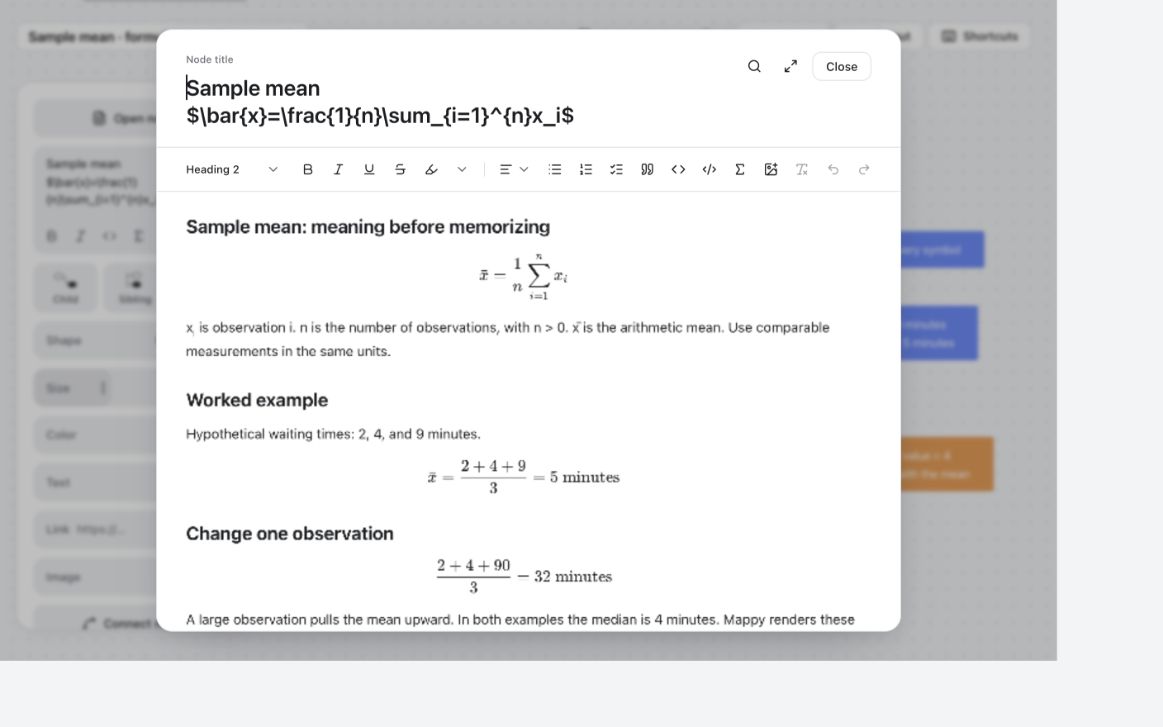
In the statistics example above, a short “Sample mean” branch opens into symbol definitions, a worked calculation, and a self-test. Read the equation-notes walkthrough to inspect the actual document and screenshots. Mappy displays formulas and code; it does not solve equations or run programs.
With a node selected and its text editor closed, Tab adds a child and Enter adds a sibling. Maps are local .mindmap documents. Download, purchase, restore, and optional cloud-folder sync may need a connection.
Mappy is not a live collaborative whiteboard or an AI map generator, and it has no iPhone, iPad, or Windows edition. If those are essential, choose a tool built for them. Check Apple's listing for current Mac compatibility.
Finish the test by leaving the app
For an editor you already have access to, save the map, close it, and reopen it. Export something a classmate or colleague can read. Make a separate copy of the editable file. Resolve confusing steps before moving a whole semester into the tool. Mappy's onboarding preview is not an unrestricted trial for importing your own documents.
Use the free evaluation sheet below to record one concrete result for each requirement. A “yes” next to equations is less useful than “I could read my formula and find the explanation two days later.” Keep originals when evaluating a replacement: Mappy's .mindmap format does not imply compatibility with MindNode or Obsidian files.
Your final question is simple: did the app help you express the idea, or did the idea become an excuse to configure the app? Choose the workflow you would willingly repeat tomorrow.
Mac mind-map app evaluation sheet
Use this outline in any notes editor, or recreate its branches in Mappy. It is a plain-text worksheet, not an automatically importable .mindmap file. No signup is needed for the template.
Download the text template (.txt)
MAC MIND-MAP APP EVALUATION

My actual task:
Required devices:
Must-have features:
App and plan being evaluated:
Localized price and billing period:

Use the same small topic in each app:
1. One central question and three branches.
2. A paragraph explaining one branch.
3. A source link and one equation, if relevant.
4. A saved editable file and a readable export.

Record what happened, not just a score:
Capture: Could I add ideas without interrupting my thinking?
Detail: Could I find the longer explanation again?
Files: Where is the document, and how will I back it up?
Sharing: Could the intended reader open the output?
Cost: Does this plan include every feature I tested?

Missing requirement:
Trade-off I am willing to accept:
Decision and reason:

Mappy's free download provides an onboarding preview. Editing your own
maps requires the one-time Full Unlock. This worksheet itself is free.
A guide from Mappy's creator. Examples are illustrative, not research findings or claims of improved grades. How these guides are written.