 mappy
mappyMappy vs MindNode: a no-subscription Mac alternative?
The short answer
Should I choose Mappy or MindNode?
Consider Mappy if you want personal mind maps with expanded notes on Mac and no subscription. Consider MindNode's free editor if its included tools meet your needs, or evaluate Plus for the premium features you need. Compare the actual workflow before paying.
Written by Mappy's creator, not an independent review. MindNode information was checked against its official documentation on 21 October 2026. This is not a hands-on benchmark of the latest MindNode release. The Mappy screenshots use our own example documents in its editor.
The pricing distinction, without the shortcut
If you are searching for a MindNode alternative without a subscription, distinguish two things: paying once for a full editor, and using a limited editor without paying at all.
Mappy's app download includes onboarding and a preview. A one-time in-app Full Unlock purchase is required to use the full editor for your own maps. The template downloads on this site do not bypass that purchase. Apple shows the localized price before you confirm; Mappy has no recurring subscription.
MindNode's free editor can create and edit documents and import or export supported formats. Plus adds premium features through a monthly or annual subscription. If the free editor already meets your needs, you do not need to buy another app just to avoid a subscription.
Compare the requirements that actually matter
| Requirement | Mappy | MindNode |
|---|---|---|
| Full-feature purchase | One-time in-app unlock | Plus subscription; basic editor is free |
| Platforms | Mac | Mac, iPhone, iPad, Apple Vision Pro, and Apple Watch |
| Longer writing | Expanded notes with headings, lists, checklists, formulas, and code | Notes and tasks listed under Plus |
| Shared work | No real-time multi-user collaboration | Collaboration listed under Plus; free users can join shared documents |
| Your own files | Local .mindmap documents; no Mappy account | Supported import and export in the free editor |
MindNode's official plan comparison is the source for its platform and plan details. Check the edition and regional price you would actually use. A larger feature list is useful only if those features match your work.
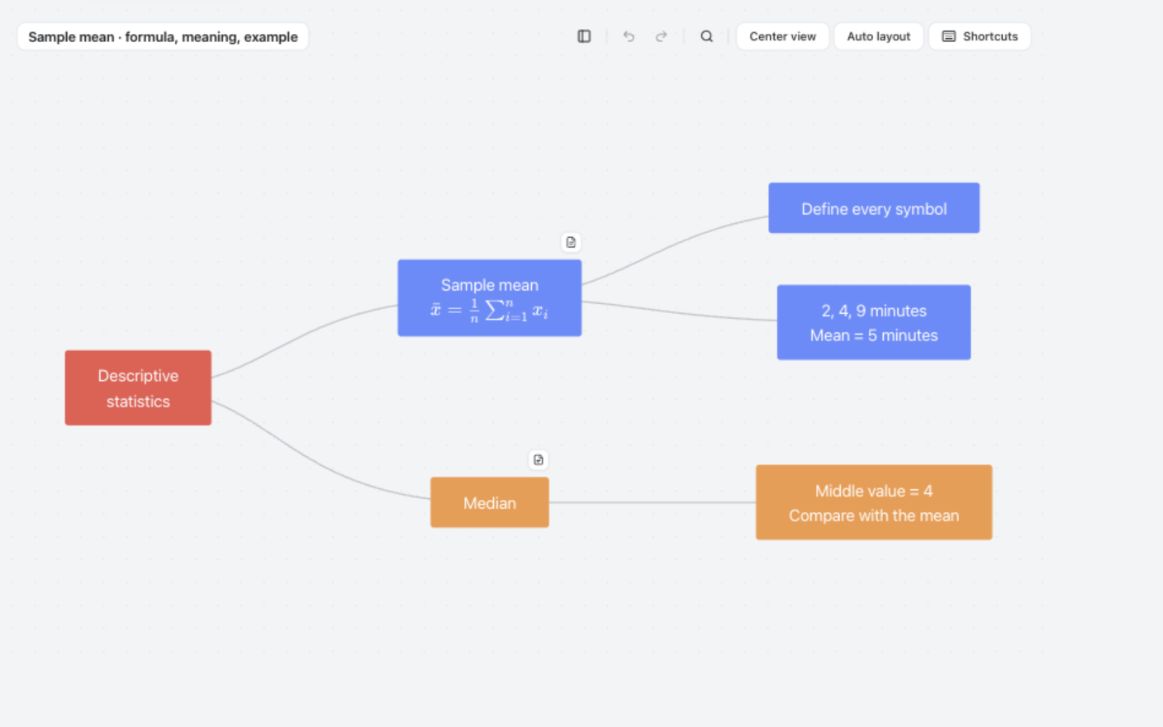
A concrete Mappy example: one formula, two levels of notes
In the map above, “Descriptive statistics” branches into “Sample mean” and “Median.” The mean's formula is visible on the canvas. Open its notes to see symbol definitions, a worked example with waiting times of 2, 4, and 9 minutes, and a second calculation showing what changes when 9 becomes 90.
That is the workflow I built Mappy for: a small overview that does not force you to squeeze a complete explanation into every node. The equation-notes walkthrough includes the screenshot of the open note and the editable example file. Mappy displays formulas and code; it does not solve equations or execute the code in your notes.
Formulas are not unique to Mappy. MindNode also documents LaTeX support. The relevant question is how you prefer to move between an idea and its explanation, not which app can claim a familiar feature first.
Try the same small assignment in both
Before buying, use Mappy's onboarding preview to explore the interaction and read the worked examples here. Its preview is not an unrestricted trial for importing your own library. If you already have Full Unlock, use the downloadable sample for a deeper check.
- Start with a topic you know, not a blank test called “hello.”
- Add a short paragraph, an equation if needed, and one source link.
- Find the paragraph again using only the map labels.
- Move two branches and check whether their explanations remain easy to find.
- Inspect a saved document and a readable export before relying on the workflow.
Use an equivalent topic in MindNode with the plan you are considering. Separate an unfamiliar command from a missing capability. You can learn where a button lives; you cannot learn your way into an unsupported platform.
When not to switch
Keep or choose MindNode if its free editor is enough, you need its supported mobile devices, or its collaboration workflow is central to your work. Mappy is not a substitute for those capabilities. If you already pay for a bundle that includes MindNode, compare the extra cost of switching rather than pretending you would necessarily save the full subscription price.
Choose Mappy when personal, detailed notes on a Mac and a one-time unlock are the important requirements. You can keep local files without creating a Mappy account. Purchase, restore, download, and any cloud-folder sync may still need the internet.
Migration is a separate decision. Mappy's .mindmap import is not direct MindNode-file compatibility. Keep originals, check supported formats, and test a small representative sample before moving important work. A good alternative should solve a real problem, not create a new one.
Three quick answers before you download
Is Mappy a free MindNode alternative?
Not as an editor for your own maps. Mappy has a free onboarding preview, followed by a one-time Full Unlock. MindNode has a basic free editor. Those are different offers.
Can Mappy replace MindNode on an iPad?
No. Mappy is a Mac app. If writing on an iPad is part of your ordinary week, a Mac-only alternative leaves that requirement unmet.
What is a useful reason to choose Mappy?
You want a branching overview with detailed study notes attached to each idea, use a Mac, and prefer a one-time purchase. For example, keep a statistical result on the canvas and its assumptions, worked example, and self-test in the note. Use the free Mac-app evaluation sheet to record whether that structure actually helps with your work.
A guide from Mappy's creator. Examples are illustrative, not research findings or claims of improved grades. How these guides are written.