 mappy
mappyLaTeX equations in notes: a worked Mappy example
The short answer
How should I organize notes that mix equations and explanations?
Store the equation with its symbol definitions, assumptions, and one worked example. In Mappy, formulas can appear in node labels and expanded notes, so the overview and the derivation can live at different levels.
Jump to the editable example download ↓
An equation alone is a weak note
You recognize the formula. But what does n count, which units belong in the answer, and what happens when one observation is unusually large? Those are the details a useful equation note keeps beside the notation.
This walkthrough builds one small statistics map in Mappy: a formula on the “Sample mean” node, then definitions and two worked calculations inside its expanded note. The downloadable file is the same original example shown in the screenshots. The numbers are hypothetical, not research data.
Mappy renders mathematical notation; it is not a symbolic algebra system or a numerical solver. The calculations below are written out and checked separately, not generated by the app.
Put the equation on a short node
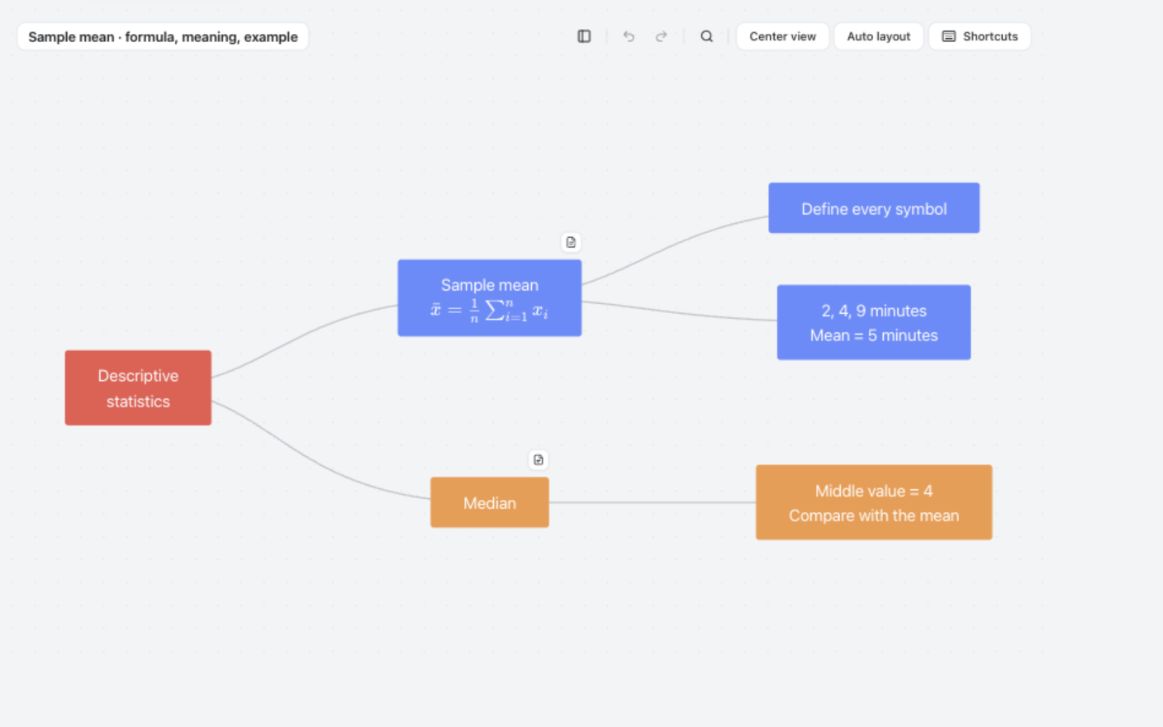
Create a “Descriptive statistics” root and a “Sample mean” child. Double-click the child's label to edit it. For a formula in the label, use a pair of dollar signs around the LaTeX expression:
Sample mean
$\bar{x}=\frac{1}{n}\sum_{i=1}^{n}x_i$
Here, the dollar signs mark the mathematical part of the node label; they are not currency. Each LaTeX command starts with one backslash. Leave the editor to inspect the rendered equation before adding more content.
Keep the rest of the overview short. In this map, “Median” is a separate branch, while “Define every symbol” and “2, 4, 9 minutes” point to what the mean note explains. The canvas should help you locate an explanation, not reproduce a textbook page.
Add definitions and a formula inside expanded notes
- Select the node and choose Add notes in the properties panel. For a node that already has notes, click its small Open notes document button.
- Click in the note body where the formula belongs, then choose Formula in the formatting toolbar.
- Enter the expression below in the LaTeX field. In this field, do not include the surrounding dollar signs.
- Choose Own line for a displayed equation, then Continue writing to add its explanation.
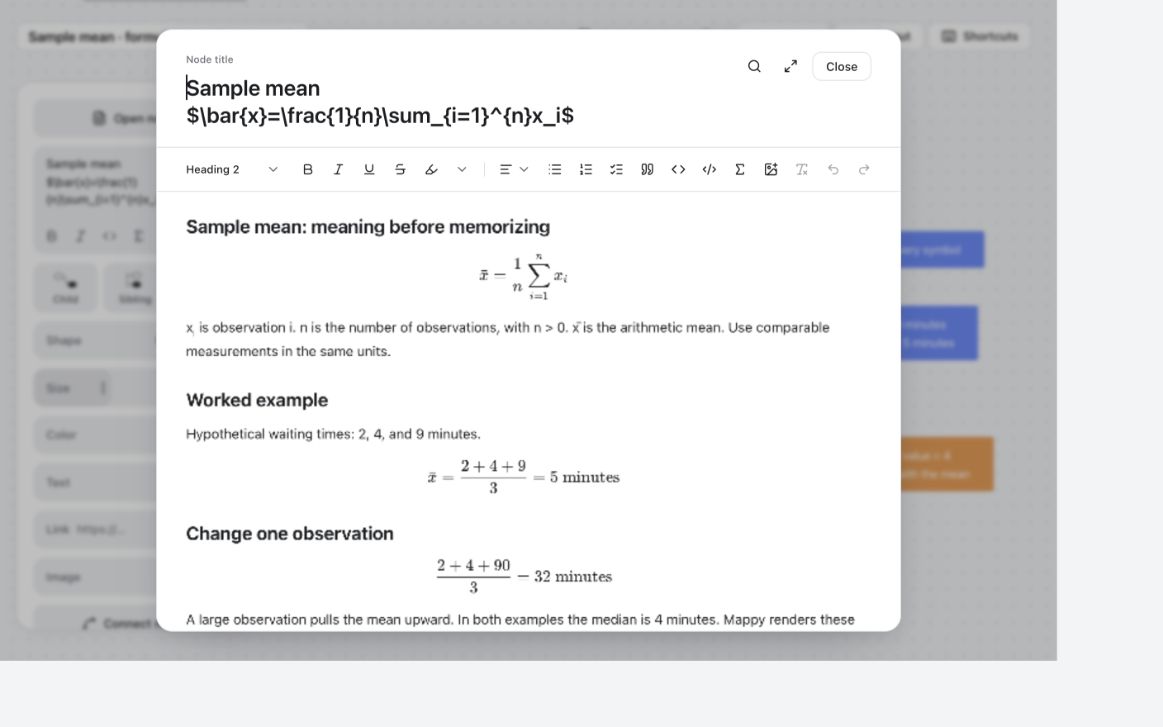
\bar{x}=\frac{1}{n}\sum_{i=1}^{n}x_iUnder it, define xᵢ as observation i, n as the number of observations with n > 0, and x̄ as the arithmetic mean. State that the measurements use the same units and represent quantities that make sense to average. For this example, every observation is a waiting time in minutes.
A formula renderer supports mathematical notation, not every LaTeX document package. Start with a small expression, check it, and only then add more complicated notation. Do not paste an entire document preamble into the formula field.
Work the numbers, then change one observation
For waiting times of 2, 4, and 9 minutes, the sum is 15 minutes across three observations. The mean is 5 minutes:
\bar{x}=\frac{2+4+9}{3}=5\;\text{minutes}Now change 9 to 90. The sum is 96 and the mean becomes 32 minutes:
\frac{2+4+90}{3}=32\;\text{minutes}The median remains 4 minutes in both sets because the middle observation has not changed. That gives the map a useful comparison, not just a formula to memorize. Ask yourself why the mean moves and what information a single average hides.
The screenshot below shows the definitions, original calculation, and changed observation in the expanded note. The node title at the top displays its editable source, while the equations in the note body are rendered. This distinction is intentional.
Turn the example into a reusable equation note
Download the map below, import it into Mappy, and replace the sample mean with a formula from your course. Editing your own maps requires Mappy's one-time Full Unlock; the app's onboarding preview is not a full document editor. You can read and copy all the examples on this page without purchasing.
- Name the concept before inserting notation.
- Define every symbol and unit.
- Record the conditions under which the formula applies.
- Include one worked example and one changed case.
- Add the course reference, page, or source you used.
- Write a question you can answer without reopening the explanation.
If you see literal commands instead of notation, check whether you are editing the node's source or looking at its rendered label. In expanded notes, use the Formula control rather than a code block. Code blocks intentionally preserve plain source text.
For a submission, inspect the exported document too. A readable editing view does not guarantee the right size on a printed page. Keep the editable map and verify mathematical results independently.
Original example · no signup
Download the sample-mean study map
Download the editable map (.mindmap)
In Mappy, open Settings → Storage → Import and select this file. It contains the example shown here, including its expanded notes. Importing creates a library copy, so keep your downloaded original for reuse.
The file is free to download. Editing it in Mappy requires the one-time Full Unlock purchase; the app's onboarding preview does not unlock your own documents. This is a Mappy document, not a universal mind-map format. You can also copy the examples from this page into your preferred notes tool.
A guide from Mappy's creator. Examples are illustrative, not research findings or claims of improved grades. How these guides are written.