 mappy
mappyShort nodes. Room for the whole explanation.
The short answer
Can a mind map also hold long-form notes?
Yes. In Mappy, a node can have a short label on the canvas and expanded notes for the full explanation. The map provides the structure; the notes hold the detail without turning every node into a paragraph.
Use the label as a signpost
A node label should help you find an idea again. “Assumptions,” “Counterargument,” or “Sampling method” can work when the surrounding map provides enough context. The label does not need to contain every qualification in the explanation.
When a label starts wrapping across several long lines, ask whether some of it belongs in the expanded note instead. Keep the part that distinguishes this idea from its neighbors. Move the supporting detail, not the meaning.
A note structure you can reuse
For an academic concept, try these headings:
- In my own words: a short explanation of the idea.
- Worked example: a concrete case, calculation, or trace.
- Watch out for: assumptions and common confusions.
- Sources: the lecture, page, or link behind the explanation.
- Check my understanding: two questions to answer later.
For a work project, replace those with context, decision, rationale, owner, and next action. The point is to make the node useful when you revisit it, not to impose the same five headings on every thought.
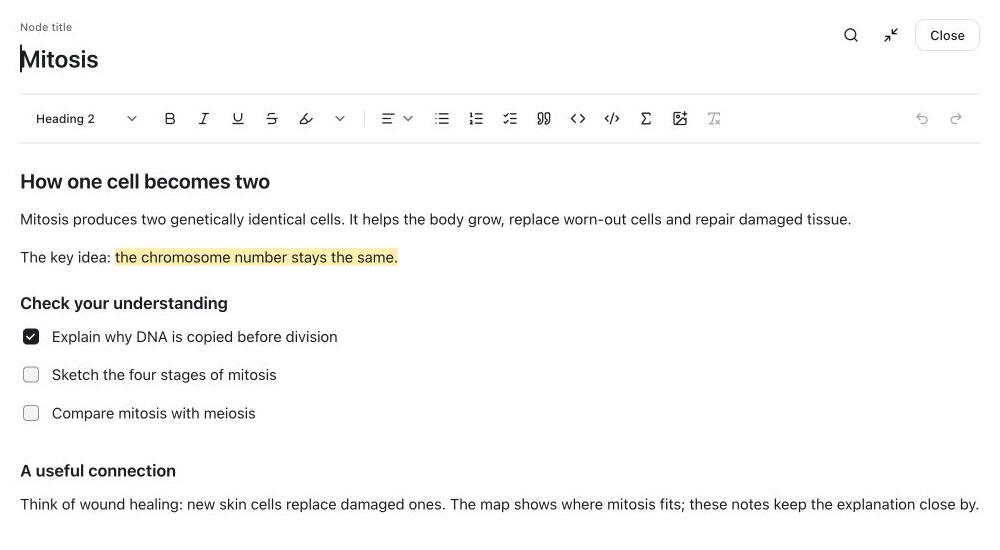
What you can keep inside Mappy's notes
Expanded notes support headings, lists, checklists, images, links, formulas, and code. You can open the notes into a larger writing view when a side panel feels cramped, then return to the map to see where the explanation belongs.
A checklist can record which questions you have reviewed. A formula can sit beside its definitions. A code block can show the example you are explaining. None of those requires making the whole map visually larger.
Formatting is a communication tool. A formula is not automatically evaluated, a code block is not an execution environment, and a checkbox is not a scheduled reminder. Use a calculator, editor, or task manager when that is the job you need done.
Avoid creating a second hidden mess
Expanded notes solve canvas clutter, but they can also hide too much information. If a note starts discussing several independent ideas, split those ideas into separate nodes. If every note repeats the same definition, keep one clear explanation and refer to it consistently in your own writing.
At the end of a review, scan only the node labels. Can you find the explanation you want without opening everything? Then open a few notes and ask whether each provides enough context to stand on its own. The two levels should support each other.
A guide from Mappy's creator. Examples are illustrative, not research findings or claims of improved grades. How these guides are written.